How to Fix Extra Fingers in AI Images
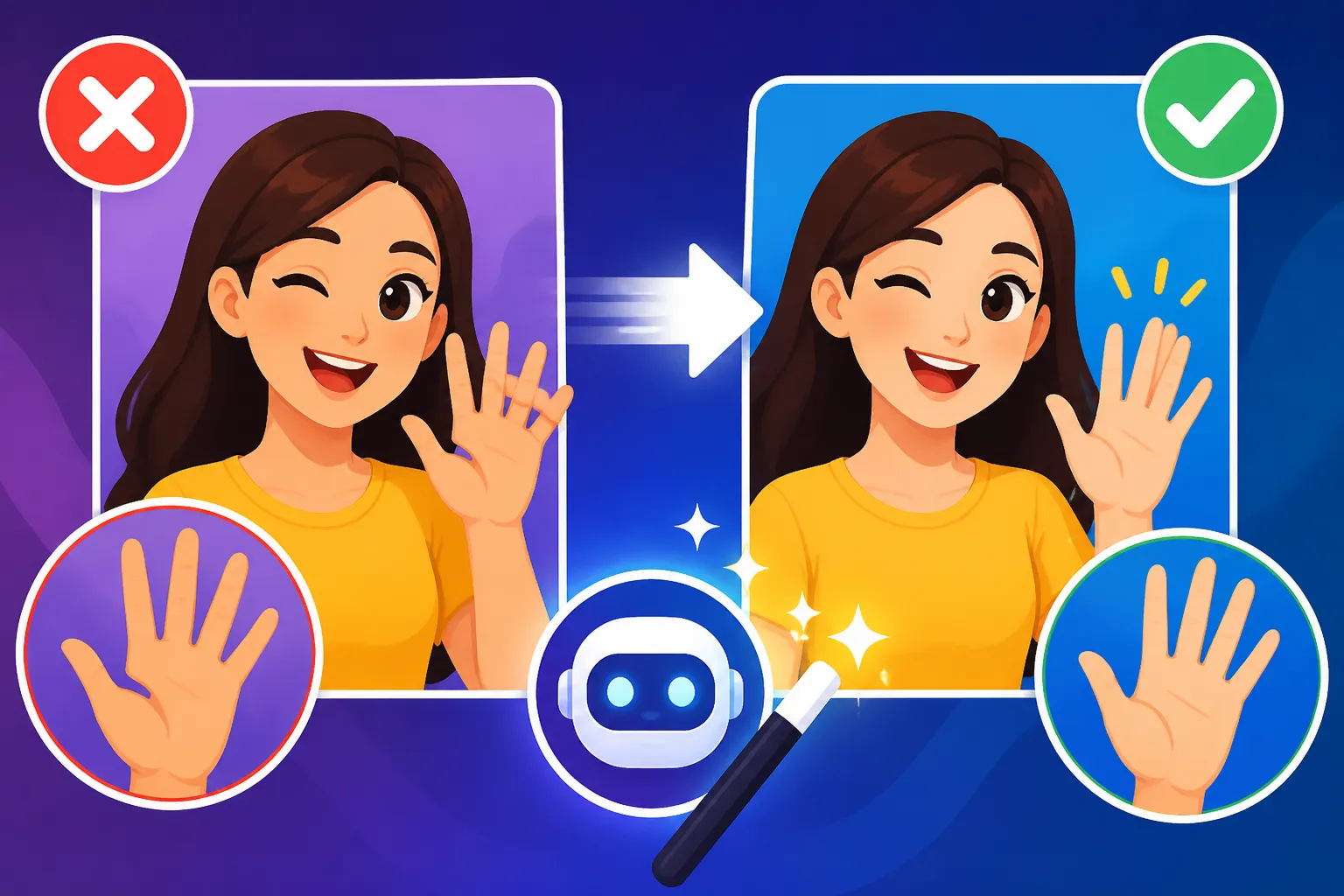
Oh, the sheer frustration! You’ve spent ages crafting the perfect prompt, generated what looks like an absolutely stunning image, and then, BAM! There it is. A hand with seven fingers, or a thumb where a pinky should be. It's enough to make you throw your hands up in despair (and ironically, probably generate another messed-up set of AI hands). This struggle is incredibly common among AI art enthusiasts and professionals alike. Rest assured, you're not alone in facing this peculiar anatomical challenge, and this guide is here to help you understand why AI struggles with hands and, more importantly, provide practical, actionable strategies to prevent and fix those dreaded extra digits in your AI-generated images.
Understanding Why AI Struggles with Hands and Fingers
It’s almost a running joke in the AI art community: "AI can create a hyper-realistic landscape with perfect lighting, but can it draw a hand with five fingers?" More often than not, the answer is a resounding "nope!" There are very real, technical reasons behind this seemingly simple failing, and understanding them is the first step toward overcoming the problem.
The Complexity of Human Anatomy for AI
Think about a human hand for a moment. It's an incredibly intricate piece of biological engineering. You have a palm, a wrist, five distinct digits, each with multiple joints, a complex interplay of tendons and muscles, and the ability to contort into an almost infinite number of subtle poses. Each finger has a specific length, width, and tapering. The thumb is oriented differently than the other fingers. Now, multiply that complexity by the vast array of lighting conditions, angles, skin tones, and interactions with objects.
For a human artist, drawing hands is often considered one of the most challenging aspects of figure drawing, even after years of practice. AI models, despite their impressive capabilities, are still just pattern recognition machines. They don't have a biological understanding of what a hand "is" or how it "works." Instead, they're trained on vast datasets of images, learning to identify visual correlations. When hands appear in these datasets, they are often small, partially obscured, in motion, or in varied perspectives. This means the AI doesn't get a clear, consistent "blueprint" of a perfect hand every single time. It learns an average representation, and when asked to generate something precise and complex like a hand, that average can often manifest as deformities.
AI's Pattern Recognition Versus True Understanding
The core of the problem lies in the fundamental difference between how humans perceive and understand the world versus how AI models process information. We understand the underlying structure of a hand – the bones, the joints, the skin, the way it moves and interacts. We know a hand must have five fingers, not six, not four (unless deliberately amputated).
AI, on the other hand, lacks this inherent understanding. It operates by identifying statistical patterns and relationships between pixels. When it sees millions of images, it might notice that a "hand-like" shape usually appears near an "arm-like" shape, and often has "finger-like" protrusions. However, it doesn't have a built-in rule that states, "there must be exactly five finger-like protrusions." It's merely trying to complete a pattern based on what it's most frequently seen, which often involves some ambiguity around hands.
This issue becomes particularly pronounced when the AI tries to generate hands in complex poses, or when there are multiple hands in a scene. The more ambiguous the context or the more detailed the interaction, the higher the chance that the AI will "guess" incorrectly, leading to extra digits, fused fingers, or bizarrely twisted anatomy. It's like asking someone who's only ever seen blurry photos of a car to draw a detailed engine – they might get the overall shape, but the intricate components will likely be a mess.
Prompting Strategies to Prevent Extra Fingers
Okay, so we know why it happens. Now, let's talk about what we can do about it. The good news is that a significant portion of the "extra finger" problem can be mitigated before you even hit the "generate" button, all through smart and precise prompting. It's all about giving the AI as much clarity as possible. For a deeper dive into prompt crafting, you might find our guide on How to Write AI Image Prompts particularly helpful.
Detail-Oriented Prompting for Hands
This might sound obvious, but being incredibly explicit in your prompts about hands can make a huge difference. Don't just say "a person." Say "a person with anatomically correct hands, each with five distinct fingers, resting casually on their lap." The more detail you provide, the less room the AI has to improvise and potentially make a mess.
Consider these key elements:
- Specify the Number of Fingers: Directly state "five fingers," "well-formed fingers," or "natural human hands." Phrases like "perfect hands" or "beautifully rendered hands" can also help guide the AI towards higher quality.
- Simple Poses: Avoid overly complex or dynamic hand gestures in your initial prompts. Starting with simpler poses like "hands by their side," "hands clasped," "hands holding a single, simple object," or "hands gently resting" gives the AI an easier task. Complex actions like "a person playing a guitar" or "a magician performing a card trick" are much more prone to errors because of the intricate finger placements required.
- Negative Prompts: This is a powerful technique. Negative prompts tell the AI what not to include. Add terms like "deformed hands," "extra fingers," "fused fingers," "amputated," "mutilated," "ugly," "bad anatomy," "poorly drawn hands." While not a magic bullet, a robust negative prompt can significantly reduce undesirable outcomes.
- Model Nuances: While this guide isn't about specific brands, it's worth noting that different AI models have different strengths. Some models are inherently better at anatomy than others. If you're using a tool that offers various models, experimenting with them, or checking community advice on How to Get Better AI Image Results can inform your choices.
Compositional Control and Distraction Techniques
Sometimes, the best offense is a good defense. If you absolutely need a human figure but hands aren't the primary focus, consider strategies to minimize their prominence or obscure them intentionally.
- Positioning: Prompt for hands to be in the background, out of focus, or in positions where they naturally recede. For example, "a person looking into the distance, hands casually tucked into their pockets" or "a portrait, focus on the face, hands slightly blurred in the background."
- Obscuration: Give the hands something to interact with that partially covers them. "A person holding a large book," "wearing long sleeves that cover the wrists," "wearing ornate gloves," or "hands behind their back" are all excellent ways to reduce the amount of visible hand that the AI needs to generate accurately. This is particularly useful for blog images or social media graphics where perfect anatomical detail isn't paramount.
- Camera Angles: Play with different camera angles. A close-up portrait might avoid hands entirely, or a wider shot could make hands a small, less detailed part of the overall scene. If you're aiming for full body shots, prompt for a full-body view from a distance, which inherently reduces the detail required for hands.
- Generate Multiple Variations: Don't settle for the first image. Most AI image generators allow you to create several variations from a single prompt. Generate 4, 8, or even 12 images, and you're far more likely to find one with acceptable hands. It’s a numbers game, and increasing your odds is a smart move. When you're just starting, check out this AI Image Prompt Guide for Beginners to get your basics down.
Iteration and Refinement
Prompting isn't a one-and-done process. It's a dialogue with the AI. You generate an image, analyze the results, and then refine your prompt based on what you see. This iterative process is crucial for achieving high-quality results, especially with tricky elements like hands.
- Small Adjustments, Big Changes: If you get a hand with six fingers, don't just regenerate the same prompt. Add "five fingers" to your prompt or intensify your negative prompts related to hands. Even minor wording changes, like swapping "holding" for "grasping," can subtly alter the AI's interpretation.
- Using Seeds: Many AI tools have a "seed" value. If you generate a good image (even one with slightly flawed hands that you plan to fix later), note its seed. You can then use that seed with a slightly modified prompt to try and get an improved version that maintains the overall composition and style you liked. This helps maintain consistency while making targeted improvements. Being aware of Common AI Image Prompt Mistakes can further refine your iterative process.
Post-Generation Fixes for Distorted Hands
Even with the best prompting strategies, sometimes those pesky extra fingers still slip through. It happens to everyone! The good news is that you don’t have to discard an otherwise perfect image. There are powerful tools and techniques available to clean up those anatomical anomalies after generation. If you've ever thought, "I wish I could just magically fix this," you're in luck, because these methods come pretty close. When dealing with images that are just "off," knowing How to Fix Bad AI Image Results can be incredibly valuable.
Inpainting and Outpainting for Quick Corrections
Many advanced AI image generators and dedicated editing tools now offer features like inpainting and outpainting, which are absolute game-changers for correcting imperfections, including deformed hands.
- Inpainting: This is like a magic eraser and paint brush combined. You essentially select the problematic area (like that six-fingered hand) and then, using a new prompt, tell the AI to regenerate only that specific masked region. For example, you might mask the offending hand and use a prompt like "a natural human hand with five fingers, holding a cup" or simply "anatomically correct hand." The AI will then try to intelligently fill in that masked area based on your new prompt and the surrounding image context. It might take a few tries, but it’s often much faster than starting from scratch. For a step-by-step guide, check out How to Edit AI Images with Inpainting.
- Outpainting: While less direct for fixing specific fingers, outpainting can be useful if the hand is cut off or needs to be repositioned slightly. You expand the canvas beyond the original image, and the AI generates new content to fill that expanded area, maintaining the style and context. You can then try to regenerate or prompt for better hands in the newly created space.
Manual Editing with Traditional Software
When AI stubbornly refuses to produce a perfect hand, or when you need a level of precision that AI isn't quite reaching, falling back on traditional image editing software is always an option. Tools like Adobe Photoshop, GIMP, Affinity Photo, or even online editors like Photopea can be lifesavers.
- Cloning and Healing: The clone stamp tool and healing brush are your best friends here. You can sample a good portion of the image (perhaps a well-formed finger from the same hand if one exists, or even from another part of the image if it's generic enough) and carefully paint over the problematic extra finger or deformity. This requires a steady hand and a keen eye, but it offers unparalleled control.
- Warping and Liquify: For subtle adjustments to finger shapes or positions, the warp or liquify tools can be used to gently push and pull pixels until the anatomy looks more natural. Be careful not to overdo it, as this can quickly make the hand look artificial or rubbery.
- Compositing: In more severe cases, you might generate a separate image of a perfect hand (or find a stock photo hand that matches the lighting and style), cut it out, and composite it onto your original image. This is more involved and requires advanced editing skills, but it guarantees a perfect hand if done well. While time-consuming, the human touch can often achieve what AI cannot, especially when trying to Remove AI Image Artifacts.
Utilizing External Upscalers and Fixers
After you've done your best with prompting and perhaps some inpainting, you might find that the overall quality still isn't quite there, or minor imperfections remain. This is where dedicated upscaling and enhancement tools come into play.
- AI Upscalers: Tools like Magnific AI Upscaler or other robust upscaling services are designed not just to increase resolution but also to intelligently add detail and refine textures. While they won't fix a grossly deformed hand, they can often smooth out minor artifacts, sharpen edges, and make subtly awkward fingers look a bit more natural. It’s a bit like giving your image a "finishing polish." You can learn more about how to get higher resolution images with How to Upscale AI Images.
- Dedicated Fixer Tools: Some niche AI tools are emerging that specifically target common AI generation flaws, including anatomical issues. These might offer features to "fix hands" or "correct faces" with a single click. Their effectiveness can vary, but they are worth exploring, especially as they continue to improve rapidly. The goal here is often to Make AI Images Look Less AI and more professionally finished.
| Method | Pros | Cons | Best For |
|---|---|---|---|
| Detailed Prompting | Prevents issues proactively, saves post-editing time | Requires practice, not 100% foolproof, can be verbose | New generations, consistent style, complex scenes |
| Negative Prompting | Reduces common deformities, broad effectiveness | Can sometimes filter out desired elements, requires tuning | General quality control, specific unwanted items |
| Inpainting / Outpainting | Targeted fixes, quick for minor to moderate issues | Can struggle with complex structures, blending might be tricky | Small tweaks, background fixes, localized regeneration |
| Manual Photo Editing | Ultimate control, professional-grade results | Time-consuming, requires design software skills, steep learning curve | Major deformities, pixel-perfect accuracy, commercial use |
| ControlNet (Advanced) | Precise pose and structure control, high consistency | Steeper learning curve, more setup, can be resource-intensive | Specific poses, character consistency, complex compositions |
| AI Upscalers / Enhancers | Refines details, improves overall quality, minor corrections | Won't fix major deformities, can introduce new artifacts | Final polish, resolution boost, subtle improvements |
Advanced Techniques and Future Outlook
As AI image generation technology continues its relentless march forward, so do the methods we use to coax it into producing more perfect results. Beyond basic prompting and post-editing, there are more advanced techniques that give you greater control, and the future promises even more sophisticated solutions for our anatomical woes. For those looking to dive deeper into the science of getting better outputs, exploring AI Image Prompt Engineering Basics is a fantastic next step.
ControlNet and Image-to-Image for Precision
These advanced features, often found in more powerful or open-source AI models like Stable Diffusion, offer a degree of control that feels almost like magic for issues such as hand anatomy.
- ControlNet: Imagine being able to upload a simple stick figure sketch or a depth map, and then having the AI generate an image that perfectly adheres to that structural outline. That's essentially what ControlNet does. You can use a reference image (perhaps a photo of a hand in the exact pose you want) and feed it to the AI via ControlNet. The AI then uses this structural information as a guide, making it far more likely to generate a hand with the correct number of fingers and appropriate pose. This is incredibly powerful for maintaining consistency and accuracy across different images, or for getting a specific, tricky pose right.
- Image-to-Image (Img2Img): This technique involves starting with an existing image – it could be a rough sketch, a photograph, or even an AI-generated image with a good composition but flawed hands – and then prompting the AI to transform it. You'd feed the image and a prompt like "a person with anatomically correct hands" into the model. The AI then uses the input image as a base, applying your prompt to refine and regenerate it. This is particularly useful for taking a problematic image and "healing" specific areas by letting the AI re-imagine them with better guidance.
Model Specific Strategies and Updates
The landscape of AI image generation is constantly evolving. What works best for one model might not be ideal for another. Staying informed about the specific strengths, weaknesses, and updates of the models you use is paramount.
- Different Models, Different Strengths: Some AI models are generally better at realism, while others excel at stylistic interpretations or typography. This often extends to anatomical accuracy. Through community forums and dedicated reviews (like our detailed Stable Diffusion Review: Free and Customizable or Midjourney Review: Features, Pricing, and Quality), you can discover which models tend to produce better hands and faces, and tailor your workflow accordingly.
- Keeping Up with Updates: AI models are frequently updated with new versions, often incorporating improvements in understanding human anatomy. For instance, updates to models like Midjourney or DALL-E have consistently shown progress in handling complex details like hands and eyes. Keeping an eye on release notes and community discussions can alert you to advancements that might make your job easier.
- Community Knowledge: The AI art community is a vibrant place for sharing tips, tricks, and prompt formulas. What one artist discovers about prompting for realistic hands in Leonardo AI, for example, could be invaluable to your own work. Don't underestimate the power of shared knowledge and experimentation.
The Future of AI and Anatomy
Let's face it, the "extra finger" problem, while frustrating, is likely a temporary quirk in the grand scheme of AI development. The trajectory of AI is towards ever-increasing sophistication and accuracy.
- Improved Training Data: As datasets grow larger and more meticulously curated, AI models will have better and cleaner examples of human anatomy to learn from. This will naturally lead to fewer errors.
- Enhanced Architectural Understanding: Future AI architectures might incorporate more explicit "rules" or modules for anatomical generation, moving beyond pure pattern matching to a more structural understanding. We're seeing glimpses of this already with advances in 3D-aware generation.
- Seamless Integration of Control: Expect more intuitive and powerful integration of control mechanisms like ControlNet directly into user-friendly interfaces, making it easier for even beginners to guide the AI with precision.
Ultimately, the day will come when perfectly rendered hands are the norm, not the exception. Until then, mastering these prompting and post-generation techniques will give you a significant edge in consistently creating high-quality AI images. The journey of AI image creation is all about learning, adapting, and finding creative solutions to the quirks of these incredible tools.
Disclaimer
The information provided in this article is for general guidance and informational purposes only. While we strive to offer accurate and up-to-date advice, the field of AI image generation is rapidly evolving. Specific features, pricing, and performance of AI tools may change without notice. Always refer to the official documentation and terms of service for any AI platform you use.