How to Make AI Coloring Books
Trying to create a beautiful, engaging coloring book can feel like an endless journey, especially when you're sketching out intricate line art page by page, or struggling to find consistent, high-quality illustrations that fit your vision. It's a hugely time-consuming process that often leads to burnout before you've even finished a quarter of your planned designs. This comprehensive guide is here to show you how modern AI image generators can become your secret weapon, transforming the daunting task of creating unique coloring books into a smooth, creative, and much faster experience.
Understanding the Basics of AI for Coloring Books
The world of AI image generation has exploded, and it's not just for creating photorealistic landscapes or fantastical creatures. These powerful tools are also incredibly adept at producing the clean, distinct line art that is the very heart of any successful coloring book. If you've ever spent hours meticulously sketching outlines or searching endlessly for copyright-free clip art, you know the frustration. AI offers a fresh, efficient alternative.
Why AI Is a Game-Changer for Line Art
For anyone looking to produce coloring books, whether for personal enjoyment, educational purposes, or commercial ventures, AI presents a massive leap forward. Traditionally, you'd need strong drawing skills, or the budget to hire an illustrator. Even then, achieving a consistent style across dozens of pages is a monumental task. AI bypasses many of these hurdles by allowing you to generate numerous variations of a concept, experiment with different art styles, and iterate rapidly until you get exactly what you're looking for.
Imagine wanting to create a coloring book based on mythical creatures. Instead of drawing each dragon, unicorn, and griffin from scratch, you can use AI to generate dozens of unique designs, all adhering to a specific aesthetic you define. This drastically cuts down on production time and allows for incredible creative flexibility. It empowers individuals who might not consider themselves artists to bring their imaginative coloring book ideas to life.
Key AI Features for Generating Line Art
When diving into AI for coloring books, you'll find certain features and approaches particularly useful. Most AI image generators excel at turning textual descriptions into visual art. The trick is guiding them to produce line art rather than fully rendered, colored images.
- Prompt Engineering: This is your primary control. By carefully crafting your text prompts, you instruct the AI to generate outlines, sketches, or line drawings. Keywords like "line art," "outline," "coloring book page," "black and white sketch," or "uncolored illustration" are essential. You'll also learn to use "negative prompts" to tell the AI what not to include, like "no color," "no shading," or "no intricate details." Learning how to write effective prompts is key to success, and you can find many helpful resources like this guide on How to Write AI Image Prompts.
- Style Control: Different AI models and even different versions of the same tool (like Midjourney's various iterations or Stable Diffusion's myriad models) have unique "personalities" when it comes to style. Some are better at realism, others at cartoons, and some truly shine with intricate patterns. Experimenting with styles like "Manga style line art," "Chibi characters coloring page," "Art Nouveau floral outline," or "geometric patterns black and white" will yield diverse results.
- Image-to-Image / ControlNet: More advanced tools often offer features that allow you to upload a reference image and then have the AI generate new images based on its composition or style. This is incredibly powerful for maintaining consistency or transforming an existing sketch into polished line art. Stable Diffusion, for example, offers ControlNet, which gives users an unparalleled level of control over composition and poses, making it an excellent option for consistent character designs.
- Upscaling and Refinement: Raw AI output might not always be high-resolution or perfectly clean for print. Many tools offer built-in upscaling features, or you can use dedicated AI upscalers to enhance resolution and sharpen lines, ensuring your coloring book pages look crisp when printed. For deeper dives, check out our insights on How to Upscale AI Images.
Step-by-Step Guide to Creating AI Coloring Book Pages
Now that you understand the "why," let's get into the "how." Creating a coloring book with AI involves a systematic approach, from initial concept to final assembly. It's an iterative process, so don't be afraid to experiment!
Crafting Effective Prompts for Coloring Book Art
This is where the magic truly begins. Your prompt is the instruction manual for the AI, so clarity and specificity are paramount. Think about what you want your coloring book to feature, its overall theme, and the desired style.
- Define Your Theme and Subject: Are you creating a book about forest animals, fantasy landscapes, intricate mandalas, or sci-fi robots? Start with a clear subject. For example, "a playful fox in a magical forest."
- Specify "Coloring Book" or "Line Art": This is critical. Without these keywords, the AI might generate fully colored images. Always include terms like "coloring book page," "black and white line art," "outline drawing," "minimalist sketch," "uncolored illustration," or "detailed line drawing for coloring."
- Choose a Style: Do you want a whimsical, cartoonish look, or something more detailed and realistic? Add style descriptors such as "children's book illustration style," "Manga style," "Art Nouveau," "traditional ink drawing," "zentangle patterns," or "geometric abstraction."
- Add Detail and Composition Cues: Describe the scene, characters, and background. "A happy dog chasing butterflies," "a serene underwater scene with coral and fish," or "a majestic castle on a hill with dragons flying overhead." You can also specify composition: "full body shot," "close-up of face," "wide shot," or "centered composition."
- Use Negative Prompts Wisely: This is often overlooked but incredibly powerful. To ensure your images are ideal for coloring, explicitly tell the AI what you don't want. Common negative prompts include: "no color," "no shading," "no gradients," "no shadows," "no grayscale," "no intricate details (if aiming for simpler designs)," "no humans (if you want only animals)."
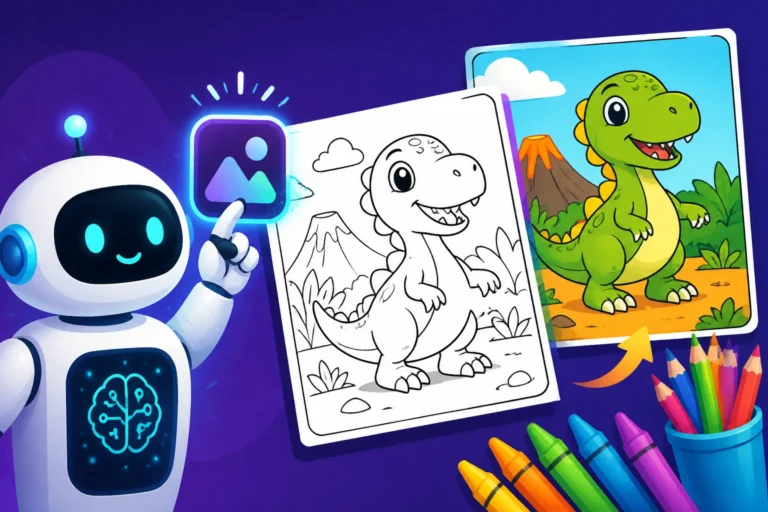
Here's an example of a strong prompt:"A majestic unicorn standing in a field of wildflowers, intricate black and white line art for a coloring book, clean outline, no shading, whimsical style, high detail, white background, suitable for children."
Remember to adjust your prompts based on the specific AI tool you're using. Some, like Ideogram, are excellent at text rendering, which could be useful if your coloring book includes motivational quotes or titles. Others, like Midjourney, excel at artistic quality, perfect for complex scenes.
Table: Essential Prompt Components for AI Coloring Books
| Component | Description | Example Keywords |
|---|---|---|
| Subject | What is the main focus of the image? | Dragon, cat, space rocket, flower, princess, forest, city |
| Art Style | The aesthetic you want the line art to have. | Manga, cartoon, realistic sketch, Art Nouveau, Zentangle, geometric, abstract |
| Line Art Spec | Crucial keywords to ensure outline generation. | Line art, outline, coloring book page, black and white sketch, uncolored illustration |
| Details/Mood | Specific elements, complexity, or emotional tone. | Intricate, simple, detailed, whimsical, serene, dynamic, cozy, playful, adventurous |
| Composition | How the subject is framed or positioned. | Full body, close-up, centered, wide shot, symmetrical, asymmetrical |
| Negative Prompts | What you absolutely don't want in the image. | No color, no shading, no gradients, no shadows, no blurry, no distorted, no watermark |
| Aspect Ratio | The desired width-to-height ratio (e.g., --ar 2:3 for portrait). |
--ar 9:16 (for phone wallpaper size), --ar 8.5:11 (common paper size), --ar 1:1 (square) |
Refining and Editing Your AI Art
Once you've generated a batch of images, it's rare that they'll be perfect on the first try. This is where the refining and editing stage comes in.
- Select the Best Generations: Review your generated images. Look for clear lines, appropriate detail levels, and compositions that work well for coloring. Discard anything that's blurry, has unwanted artifacts, or just doesn't fit your theme. Sometimes, the AI can still produce images with errors or "extra fingers" if the prompt isn't specific enough. Our guide on How to Fix Bad AI Image Results can be a lifesaver here.
- Upscaling for Print Quality: Most AI tools generate images at a moderate resolution. For printing a coloring book, you'll want high-resolution images, typically 300 DPI (dots per inch). Use the built-in upscaling features of your chosen AI tool (if available) or an external AI upscaler like Magnific AI. This will ensure your lines are crisp and professional-looking.
- Minor Adjustments in Image Editing Software: Even with the best AI, you might need to make small tweaks. Use software like Adobe Photoshop, GIMP, or even basic photo editors to:
- Clean up stray lines: Sometimes the AI leaves small, unwanted marks.
- Darken lines: If the lines are too faint, you can enhance their contrast.
- Simplify complex areas: If a section is too busy for coloring, you can remove some details.
- Add whitespace: Ensure enough blank space around the illustration for a clean page layout.
- Crop and Resize: Adjust the canvas to perfectly fit your book's page dimensions.
- Ensuring Consistency: This is paramount for a professional-looking coloring book. If you're creating a series of characters, try to use the same seed value (if your AI tool supports it) or descriptive phrases in your prompts to maintain their appearance and style across pages. For specific tools, you might find articles like Midjourney Parameters Explained helpful in achieving consistency.
Assembling Your Coloring Book
With your refined line art ready, it's time to put it all together into a cohesive coloring book.
- Layout and Design: Use a desktop publishing program (like Adobe InDesign, Canva, Affinity Publisher, or even Google Docs for simpler layouts) to arrange your images on pages. Consider:
- Page Margins: Leave enough space around your illustrations so they don't look cramped and are easy to color without going into the binding.
- Single-Sided vs. Double-Sided: For coloring books, printing on single-sided pages is often preferred to prevent bleed-through, especially if markers are used. If double-sided, ensure the paper is thick enough.
- Adding Text: Include titles, captions, or short descriptions on each page if desired. This can add an educational or storytelling element.
- Front and Back Covers: Design an engaging cover that clearly communicates the theme of your coloring book. You can use AI to generate stunning cover art too!
- File Format: Save your completed book in a print-ready PDF format. This ensures that fonts and layouts remain consistent across different viewing and printing devices. High-resolution images embedded in the PDF are crucial for quality.
- Proofreading: Before sending anything to print, meticulously proofread every page. Check for layout issues, typos in any text, and image quality. Print a test copy if possible to see how the lines look on actual paper.
Best Practices for High-Quality AI Coloring Book Designs
Creating a successful AI coloring book isn't just about generating pretty pictures; it's about thoughtful design, consistency, and respecting intellectual property.
Ensuring Consistency and Style Across Pages
One of the biggest challenges in any illustration project, especially coloring books, is maintaining a unified look and feel. AI can help, but it requires strategy.
- Establish a Style Guide: Before you even start prompting, decide on your book's aesthetic. Will it be cartoonish, realistic, whimsical, or intricate? Having a clear style guide in mind will help you craft more consistent prompts. For instance, if you decide on a "storybook fantasy" style, stick with that descriptor in all your prompts.
- Use Consistent Prompting: Employ a core set of keywords and phrases for all your generations. If you start with "black and white line art, whimsical forest animals," don't switch to "realistic charcoal sketch, jungle creatures" halfway through. Minor variations are fine, but keep the core descriptive elements stable. Many prompt guides, like the Midjourney Prompt Guide, can teach you how to maintain specific styles effectively.
- Leverage Seed Numbers (if available): Some AI tools allow you to use a "seed" number, which can help reproduce similar image characteristics. If you generate an image you particularly like, note its seed and try to use it for subsequent images in the same book, adjusting other prompt elements as needed. This is particularly useful for maintaining character appearances or specific compositional styles.
- Iterate and Refine: Don't settle for the first few generations. Generate many images, pick the best ones, and use them as inspiration or even direct input for further generations (e.g., using an "image-to-image" feature). This iterative process helps you zero in on the exact look you want.
- Manual Touch-ups: Sometimes, even with consistent prompting, minor discrepancies will occur. Be prepared to use your image editing software to unify line thickness, remove stray pixels, or smooth out rough edges to ensure a polished, professional look.
Legal and Commercial Considerations
This is a critical, often misunderstood aspect of using AI for commercial projects like coloring books. While the technology is exciting, the legal landscape is still evolving.
- Understand Copyright and Ownership: The copyright status of AI-generated art is currently a gray area in many jurisdictions. In the United States, for example, the Copyright Office has indicated that AI-generated works without sufficient human authorship may not be eligible for copyright protection. This means you might not own the exclusive rights to your AI-generated images in the same way you would for art you created entirely yourself. Always consult the latest legal advice or professional legal counsel regarding copyright for your specific use case.
- Review AI Tool Terms of Service (ToS): Every AI image generator has its own terms regarding commercial use.
- Adobe Firefly: Adobe is one of the few companies that offers indemnification for its Firefly users, meaning they stand behind the commercial safety of images created with Firefly and will cover legal costs if a copyright claim arises from using their commercially-safe models. This is a huge advantage for creators looking to sell their work. You can read more about Adobe Firefly Commercial Safety Review and its IP indemnification.
- Midjourney, DALL-E, Stable Diffusion, Leonardo AI, Ideogram: These tools typically allow commercial use, often with caveats depending on your subscription tier. Always read their specific ToS carefully. Some may require attribution, while others grant broad commercial rights. For instance, some free tiers might restrict commercial use or apply watermarks. Our article on Free AI Image Generators with Commercial Use provides a good overview.
- Public Domain vs. Originality: Be mindful that AI models are trained on vast datasets of existing images. While the output is "new," there's a theoretical (though often remote) possibility of generating something similar to an existing copyrighted work. Focusing on unique prompt combinations and incorporating your own creative input can help mitigate this.
- Transparency with Customers: While not legally required, some creators choose to be transparent about using AI in their product descriptions. This can build trust with buyers and is generally good practice in a rapidly evolving creative landscape.
Tips for Monetizing Your AI Coloring Books
Once you've poured your creativity into designing a fantastic AI coloring book, the next logical step is to share it with the world and, hopefully, earn some income from your efforts.
Platforms for Selling Your Creations
There are several avenues for selling your AI-generated coloring books, each with its own benefits and considerations.
- Etsy: This is a fantastic platform for digital products, including printable coloring books. You can offer instant downloads of PDF files, making it easy for customers to purchase and print at home. Etsy's audience is already looking for unique, handmade (or in this case, creatively made) items, and coloring books are consistently popular. Optimizing your shop with clear descriptions, appealing mock-ups of your pages, and relevant keywords will help you stand out.
- Amazon KDP (Kindle Direct Publishing): Amazon KDP allows you to self-publish both physical print-on-demand books and eBooks (though coloring books are best as print). You upload your interior files (the pages) and your cover, and Amazon handles the printing, shipping, and customer service. This gives you access to Amazon's massive global audience. The key here is ensuring your files meet their strict formatting requirements for bleed, trim size, and resolution.
- Your Own Website/Storefront (e.g., Shopify, Gumroad): For maximum control over branding, pricing, and customer data, selling directly from your own website is an excellent option. Platforms like Shopify make it relatively easy to set up an e-commerce store, or you can use simpler platforms like Gumroad for digital product sales. This allows you to build a direct relationship with your audience and keep a larger percentage of your sales. You can also easily create bundled offers or exclusive content.
- Creative Market / Other Digital Asset Marketplaces: Platforms like Creative Market, Redbubble, or Society6 allow you to sell your designs as digital assets or apply them to various physical products (like t-shirts, mugs, or posters), including coloring pages. This can be a great way to diversify your income streams beyond just the book itself.
Marketing Your Creations Effectively
Having a great product is only half the battle; people need to know it exists! Effective marketing is crucial for driving sales.
- Showcase Your Best Pages: Create visually appealing mock-ups or sneak peeks of your coloring book pages. Use platforms like Instagram, Pinterest, and Facebook to share these images. Highlight the intricacy, the style, and the unique aspects that make your book special. Use relevant hashtags like #coloringbook, #adultcoloringbook, #kidscoloringpages, #aigeneratedart, #lineart.
- Target Your Audience: Who is your coloring book for? Children? Adults seeking stress relief? Fans of a particular genre (e.g., fantasy, nature, mandalas)? Tailor your marketing messages and platform choices to reach this specific audience. For example, if it's for kids, you might engage with parenting groups or educational blogs.
- Collaborate and Cross-Promote: Partner with other content creators, bloggers, or influencers in the arts, crafting, or self-care niches. Offer them a free copy of your coloring book to review or feature. This can expose your work to a wider, relevant audience.
- Offer Free Samples or Bundles: Consider offering a few free printable pages as a lead magnet to collect email addresses or as a taster for your full book. This can entice potential buyers and help you build an email list for future promotions. You might even create a mini-bundle of themed pages to encourage larger purchases.
- Engage with the Community: Join online communities dedicated to coloring, AI art, or digital creation. Share your process, ask for feedback, and genuinely engage with others. This builds connections and visibility for your work. Don't just self-promote; be a valuable member of the community.
- Utilize SEO (Search Engine Optimization): Just like this guide, your product listings and website content should use keywords that potential customers are searching for. Think about what terms people would type into Etsy or Amazon to find a coloring book like yours (e.g., "mandala coloring book," "animal line art printable," "fantasy creature coloring pages").
Making AI coloring books is a fantastic creative endeavor that leverages cutting-edge technology to unlock new possibilities for artists, hobbyists, and entrepreneurs alike. With thoughtful prompting, careful refinement, and a strategic approach to selling, you can turn your ideas into a vibrant reality.
Disclaimer
Please remember that the information provided in this article is for general guidance only. The field of AI image generation, including its capabilities, best practices, and legal considerations (especially regarding copyright and commercial use), is rapidly evolving. Always consult the most current terms of service for any AI tools you use and seek professional legal advice for specific situations regarding intellectual property and commercial ventures.